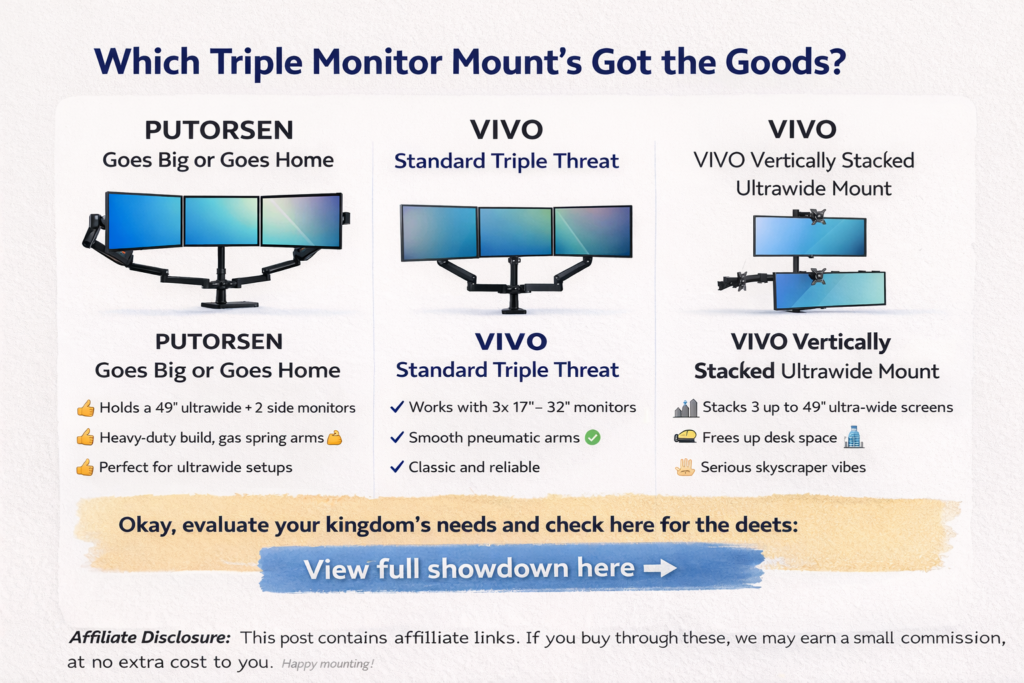
🔧 PUTORSEN Heavy-Duty Triple Monitor Arm
Best for ultrawide + mixed screen setups
If you’re rocking a big ultrawide (up to 49”) in the middle and two side monitors, this one means business. The gas-spring arms feel premium, adjustments are smooth, and once it’s locked in — it stays put.
Why it stands out:
- Handles heavy monitors without sagging
- Super adjustable (tilt, swivel, rotate — the whole deal)
- Clean cable management keeps your desk from looking like spaghetti 🍝
Heads-up:
This is overkill if you’re using smaller, lightweight screens — but for power users, that’s kind of the point.
👉 Check current availability on Amazon
⚙️ VIVO Triple Pneumatic Monitor Mount (Horizontal Layout)
Best all-around option for most people
This is the “safe pick” — and that’s not a bad thing. If your monitors are 17”–32”, this mount just works. Easy install, solid arms, and enough flexibility to dial in a comfortable setup.
Why people love it:
- Reliable and sturdy for everyday use
- Smooth pneumatic arms for easy adjustments
- Great balance between price and performance
Where it falls short:
Not designed for super-heavy or ultra-wide screens.
👉 Check current availability on Amazon
🧱 VIVO Vertically Stacked Triple Ultrawide Mount
Best for vertical productivity monsters
This one’s for folks who like their screens stacked top-to-bottom. Think coding, trading, video editing, or data-heavy work where vertical space is king.
What makes it different:
- Supports three ultrawide monitors (up to 49” each)
- Rock-solid center pole design
- Perfect for tight desks with limited width
Just know:
Adjustments aren’t as “quick-smooth” as gas-spring arms — this is more set-it-and-forget-it.
👉 Check current availability on Amazon
🏁 Final Verdict: Which One Should You Pick?
- Go PUTORSEN → If you want a premium, heavy-duty setup with max flexibility
- Go VIVO Horizontal → If you want the easiest, most reliable triple-monitor setup
- Go VIVO Vertical → If vertical screen space is your productivity superpower
No hype — just pick the one that matches your monitors, your desk, and how you actually work.